← Back to Insights
Bill Zujewski
October 29, 2026

Sponsors want a projected footprint in the proposal. Corporate clients want a final number in the wrap-up report. Most teams run a carbon footprint calculator for events only once and end up with either a guess or a number that arrives too late to act on.
The most accurate way to use a carbon footprint calculator for events is in three passes: estimate emissions before the event, collect real data during it, then update the footprint afterward with actual figures. The estimate guides planning, and the final footprint is what you report. Comparing the two shows you what to fix next time.
Each pass uses the same formula. Only the quality of the data changes:
Emissions (kg CO2e) = Activity data × Emission factor
This guide walks through the workflow:
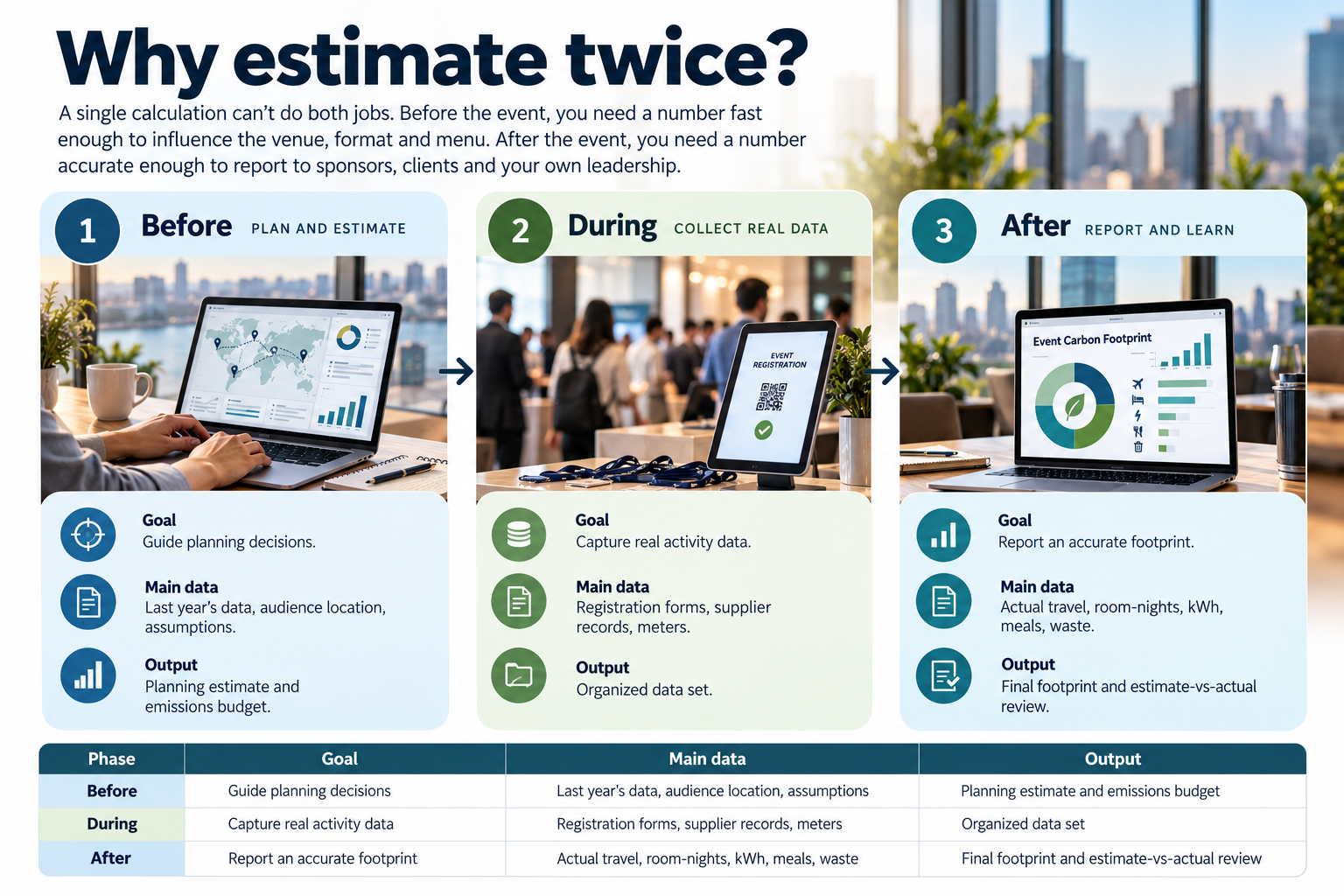
A single calculation can't do both jobs. Before the event, you need a number fast enough to influence the venue, format and menu. After the event, you need a number accurate enough to report to sponsors, clients and your own leadership.
The industry's own guidance follows the same pattern. The Net Zero Carbon Events travel and accommodation guidance recommends estimating expected travel emissions before the event. After the event, it calls for "a more accurate calculation of emissions caused by travel ... using all data collected."
The gap between the two numbers matters too. It shows which assumptions were wrong, so next year's estimate starts closer to reality.
| Phase | Goal | Main data | Output |
| Before | Guide planning decisions | Last year's data, audience location, assumptions | Planning estimate and emissions budget |
| During | Capture real activity data | Registration forms, supplier records, meters | Organized data set |
| After | Report an accurate footprint | Actual travel, room-nights, kWh, meals, waste | Final footprint and estimate-vs-actual review |
A planning estimate gives you a number while you can still change the plan. It doesn't need to be precise, but it does need to be documented.
Travel deserves the most care. The Net Zero Carbon Events measurement methodology observes that travel makes up about 70–90% of an average event's emissions. For more on which sources matter most, see our guide to what makes up an event carbon footprint.
The data that makes your final footprint accurate is created during the event cycle, starting at registration. If you don't ask for it then, it's hard to recover afterward.
| Category | Data to collect | Where it comes from | When to ask |
| Attendee travel | Departure city, travel mode, flight details | Registration form, optional post-event survey | At registration |
| Staff and speaker travel | Trips, distances, cabin class | Travel bookings and expense reports | Before and after |
| Lodging | Room-nights by hotel | Hotel room-block reports, expense reports | After checkout |
| Venue energy | Metered kWh, fuel for heating or generators | Venue meter readings or utility bills | Before setup and after teardown |
| Food and beverage | Meals served by menu type, food waste | Caterer invoices and menus | After the event |
| Materials and freight | Weights, quantities, shipping distances | Vendor and shipping invoices | After the event |
| Waste | Weight by stream: landfill, recycling, compost | Hauler or venue waste report | After teardown |
A few practical steps make this much easier:
Once the event ends, replace each assumption from your planning estimate with actual data. Fill in what's still missing, then report the result.
Reporting is still uneven across the industry. In the Net Zero Carbon Events 2025 reporting results, only 54% of event organizers said they currently measure Scope 3 emissions. Upstream food and beverage emissions were among the least-reported categories, at 7%.
Here's the before-and-after for a two-day conference in Chicago. The planning estimate assumed 300 attendees. Actual attendance was 280. All inputs are illustrative. Emission factors come from the EPA Hub 2025, the Chicago-area eGRID factor, a U.S. hotel factor of 16.1 kg CO2e per room-night, and meal factors of 6.29 kg (beef), 0.51 kg (vegetarian) and 2.04 kg (average) from Projet Celsius.
| Category | Planning estimate (inputs) | Estimate (kg CO2e) | Actual (inputs) | Actual (kg CO2e) | Change |
| Travel | 120 drive 150 mi; 165 fly 1,000 mi; 15 fly 5,000 mi | 39,171 | 90 drive 120 mi; 165 fly 1,100 mi; 25 fly 5,200 mi | 48,210 | +23% |
| Lodging | 350 room-nights | 5,635 | 410 room-nights | 6,601 | +17% |
| Venue energy | 10,000 kWh | 4,155 | 13,500 kWh (metered) | 5,609 | +35% |
| Meals | 1,200 meals × 2.04 kg average | 2,448 | 380 beef + 740 vegetarian meals | 2,768 | +13% |
| Total | 51,409 (≈ 51 t) | 63,187 (≈ 63 t) | +23% | ||
| Per attendee | 171 kg | 226 kg | +32% |
Twenty fewer people attended, but the footprint rose by about 12 t. The main reasons:
The review leaves next year's planning team three concrete fixes. Watch long-haul registrations against the budget, budget for setup days, and make vegetarian the default menu.

Aclymate keeps your planning estimate, your real data and your final footprint in one system, so the before-and-after comparison happens automatically.
Branded merchandise distributor Whitestone used Aclymate to measure a 4,053 tCO2e annual footprint and earn Climate Leader certification. It now answers customer sustainability requests with confidence.
Use it in three passes. Estimate emissions before the event to guide planning, collect real activity data during it, then update the footprint afterward with actual figures for reporting.
Both. A pre-event estimate helps you choose lower-carbon options while you can still change them. A post-event calculation with real data gives you an accurate number to report.
Collect attendee departure cities and travel modes at registration, hotel room-night reports, metered venue energy, meal counts by menu type, and waste weights by stream. Most of it comes from your registration platform and supplier invoices.
Apply the travel mix of the attendees who did report to those who didn't, and label it as an extrapolation. State your response rate in the final report.
It's a planning tool, so expect a gap. In our example, the actual footprint came in 23% higher than the estimate, mainly because more attendees flew long-haul than expected.
Report total tCO2e, emissions per attendee, the boundary, data sources and key assumptions. Note which figures are measured and which are estimated. Then include the event in your company's Scope 3 inventory.
A planning estimate helps you make better decisions. A final footprint built on real data gives you a number you can report with confidence. Doing both, every time, is how event emissions actually come down.
Ready to build your before-and-after workflow? Start free with Aclymate Explorer to get a baseline in minutes, or book a demo to see how Aclymate's software and experts can measure, reduce and report your event and company emissions without adding headcount.
Get Aclymate's practical sustainability content delivered weekly.

Most conference emissions come from attendee travel and hotel stays. Learn where a conference footprint comes from and how organizers measure it.
Read Article

See how event carbon footprint calculators estimate emissions from travel, hotel nights, venue energy, and meals, and where their defaults fall short.
Read Article

Use quick event carbon estimates to compare cities, venues, formats, and menus before you commit, and set a realistic emissions budget for each event.
Read Article
Talk with a Sustainability Expert, see a demo, or start free to put the Aclymate platform and experts to work for your team.