← Back to Insights
Bill Zujewski
November 25, 2026

Your customers are asking for your Scope 3 emissions, and most of those emissions sit with your suppliers. Spend-based estimates get you started, but they can't show real reductions or satisfy customers who want supplier-specific numbers. Supplier emissions data collection is how you close that gap, and most companies find it harder than expected.
To collect emissions data from suppliers, prioritize the suppliers that drive most of your Scope 3, send each one a request sized to its maturity, make it easy and free to respond, check and allocate what comes back, and follow up on a regular cycle. Most programs start with a handful of key suppliers and expand each year.
Supplier data enters your inventory through a simple formula:
Your share of supplier emissions = Supplier's emissions × Your share of their output
This guide walks through seven steps:
You don't need data from every supplier. Start with the ones that matter most to your footprint.
CDP's guidance on implementing primary data and supplier engagement puts it simply: "Don't let perfection get in the way of action."
Ask for what you'll actually use, and size the request to the supplier. A 20-person supplier can't produce a full Scope 3 inventory, and asking for one usually gets no response.
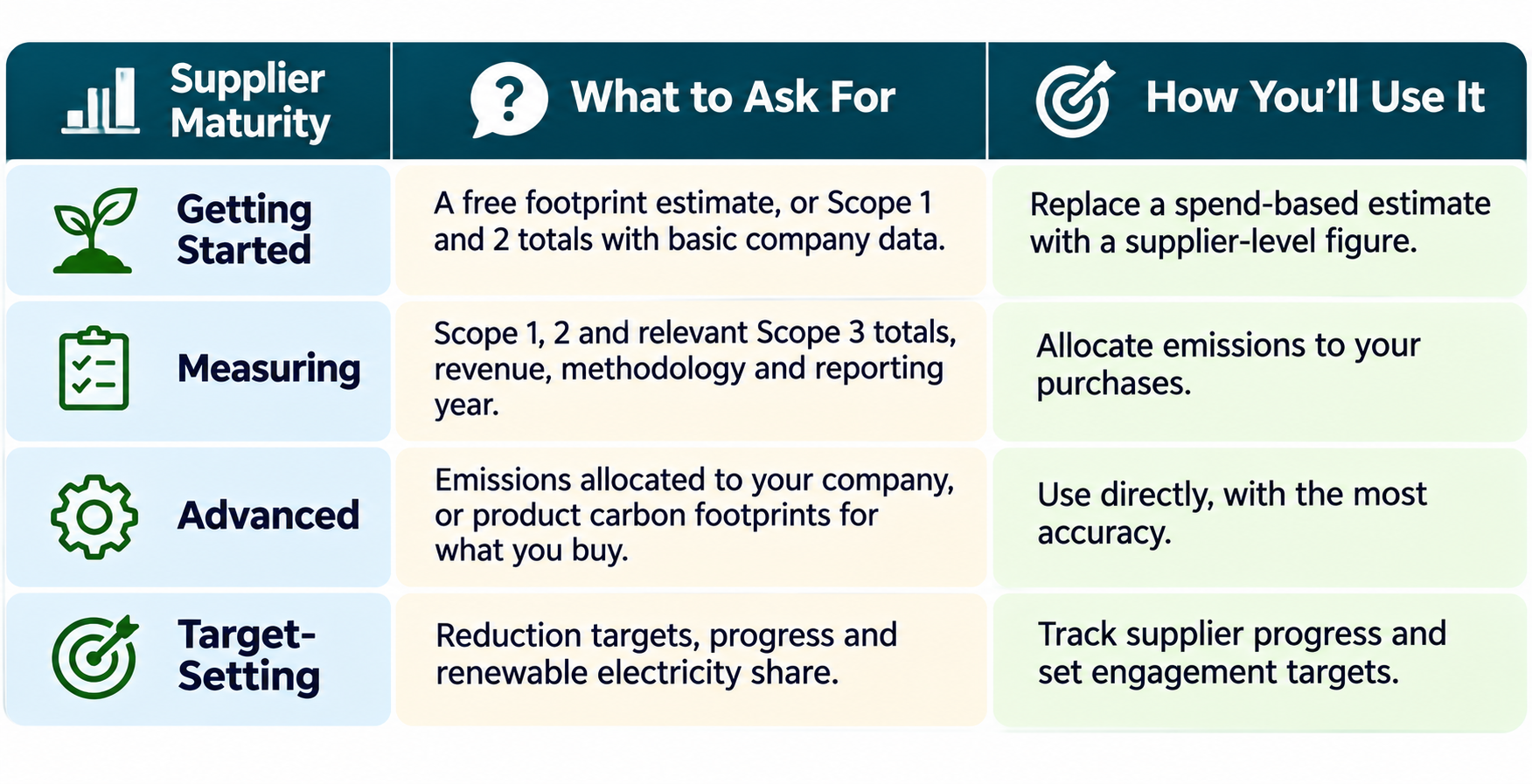
Whatever the tier, ask for the context that makes the number usable:
If you buy from EU-based suppliers, keep requests proportionate. Under the EU's Omnibus changes, suppliers with fewer than 1,000 employees are protected by a value-chain cap. Reporting companies can't require more than a voluntary standard for smaller companies covers, according to Latham & Watkins.
The response method determines your response rate. Options range from spreadsheets to dedicated platforms.
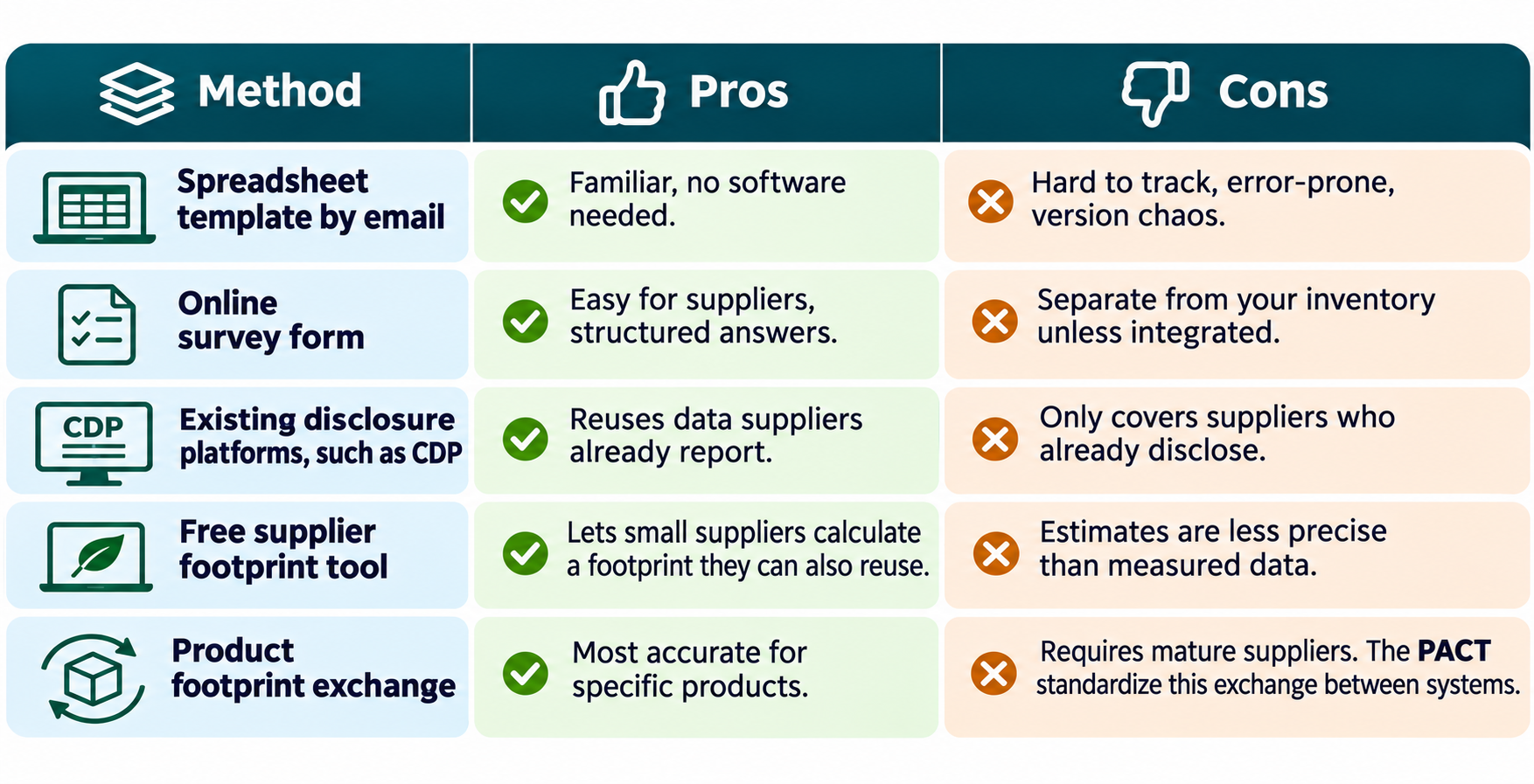
For most growing companies, the best results come from letting each supplier use the simplest method that gives you usable data. Use a free footprint tool for small suppliers, existing CDP responses for those who already disclose, and product footprints for strategic suppliers.
How you ask matters as much as what you ask.
Most suppliers won't respond to the first request. Plan for follow-up from the start.
Supplier data needs checking before it goes into your inventory. CDP's analysis found that companies often consider supplier emission factors "not robust or verified."
Check each response for:
If a supplier gives you its total emissions rather than an allocated figure, you need to work out your share. The two common approaches:
Physical allocation is usually more accurate when products differ in material and energy use per dollar. The GHG Protocol is also tightening this area: its March 2026 progress update on the Scope 3 Standard revision proposes limiting corporate-level allocation to suppliers with homogeneous products. The proposal isn't final.
Here's how the allocation choice changes the result for one plastic parts supplier. The spend-based factor is 0.391 kg CO2e per dollar for laminated plastic parts, from the Supply Chain GHG Emission Factors v1.4.0. Supplier figures are illustrative.
Supplier data: 3,000 t CO2e Scope 1 and 2, plus 12,000 t of upstream emissions, for a total of 15,000 t. Annual revenue is $50 million, from 2,000,000 units shipped.
Your purchases: $2.5 million, for 150,000 units.
| Method | Calculation | Your share (t CO2e) | Compared with spend-based |
| Spend-based estimate | 2,500,000×0.391kg/ | 977.5 | Baseline |
| Economic allocation | 15,000 t × ($2.5M ÷ $50M = 5%) | 750.0 | 23.3% lower |
| Physical allocation | 15,000 t × (150,000 ÷ 2,000,000 units = 7.5%) | 1,125.0 | 15.1% higher |
The two allocation methods differ by 375 t for the same supplier. You buy 5% of the supplier's revenue but 7.5% of its units, so your parts carry less revenue per unit than the supplier's average product.
If your parts use a similar amount of material per unit as the supplier's other products, physical allocation better reflects your share. The best option is to ask the supplier to allocate emissions to you directly, or to share product carbon footprints for the parts you buy.
Aclymate gives growing companies the tools and the people to run a supplier data program, without a sustainability team.
Food and beverage manufacturer LiDestri Foods used Aclymate to set up structured collection of Scope 3 supplier data across multiple facilities, ingredient suppliers and packaging partners, without adding internal headcount. Branded merchandise supplier API Source had Aclymate's Carbon Bookkeepers organize its emissions and supplier data to answer customer questionnaires faster.
For more on choosing software, see our guides to Scope 3 software for automotive suppliers and the best carbon accounting software.
Prioritize the suppliers that drive most of your Scope 3, send each one a request sized to its maturity, and give them a simple, free way to respond. Then check the data, allocate it to your purchases, and follow up every year.
At minimum, ask for Scope 1 and 2 emissions, the reporting period, boundary and method. More mature suppliers can share relevant Scope 3, emissions allocated to your company or product carbon footprints. Always ask whether the data has been verified.
Start with the suppliers that account for the most estimated emissions in a spend-based screening. Refine the list by your leverage, the supplier's strategic importance and its existing climate maturity.
Multiply the supplier's emissions by your share of its output. Economic allocation uses your share of its revenue, and physical allocation uses your share of units or weight. Physical allocation is usually more accurate when products differ, and supplier-allocated or product-level data is best of all.
Keep the spend-based estimate for that supplier and follow up. Reminders, a phone call, a free and simple response method and clear explanations of why you're asking all raise response rates.
Once a year, on the same cycle as your inventory. Annual updates keep data current and show supplier reductions over time.
You don't need every supplier on day one. Pick the ten that matter most, send them a simple request and build from there.
Ready to bring your suppliers in? Start free with Aclymate Explorer and send your first supplier invitations, or book a demo to see how Aclymate's software and experts can collect, check and report your supplier emissions without adding headcount.
Get Aclymate's practical sustainability content delivered weekly.

How product carbon footprint software calculates emissions from materials, energy and freight, uses supplier data, and what to look for before you buy.
Read Article

Scope 3 emissions software helps you measure supply chain emissions, replace estimates with supplier data, find hotspots and cut emissions. What to look for.
Read Article

A practical framework for lower-emission conferences, meetings, and events, starting with the choices that cut the most carbon: location and travel.
Read Article
Talk with a Sustainability Expert, see a demo, or start free to put the Aclymate platform and experts to work for your team.